1. Navigating the Business Resiliency Module
- Go to the Business Resiliency Module.
- In the left-hand menu, you will find various sections related to business continuity, disaster recovery, and crisis management.
- Select "Business Continuity & Disaster Recovery Plans" to create and manage resilience plans.
Example:
If your organization needs a structured approach to handling disruptions like natural disasters, cyber incidents, or supply chain failures, this module helps document and track response and recovery efforts.
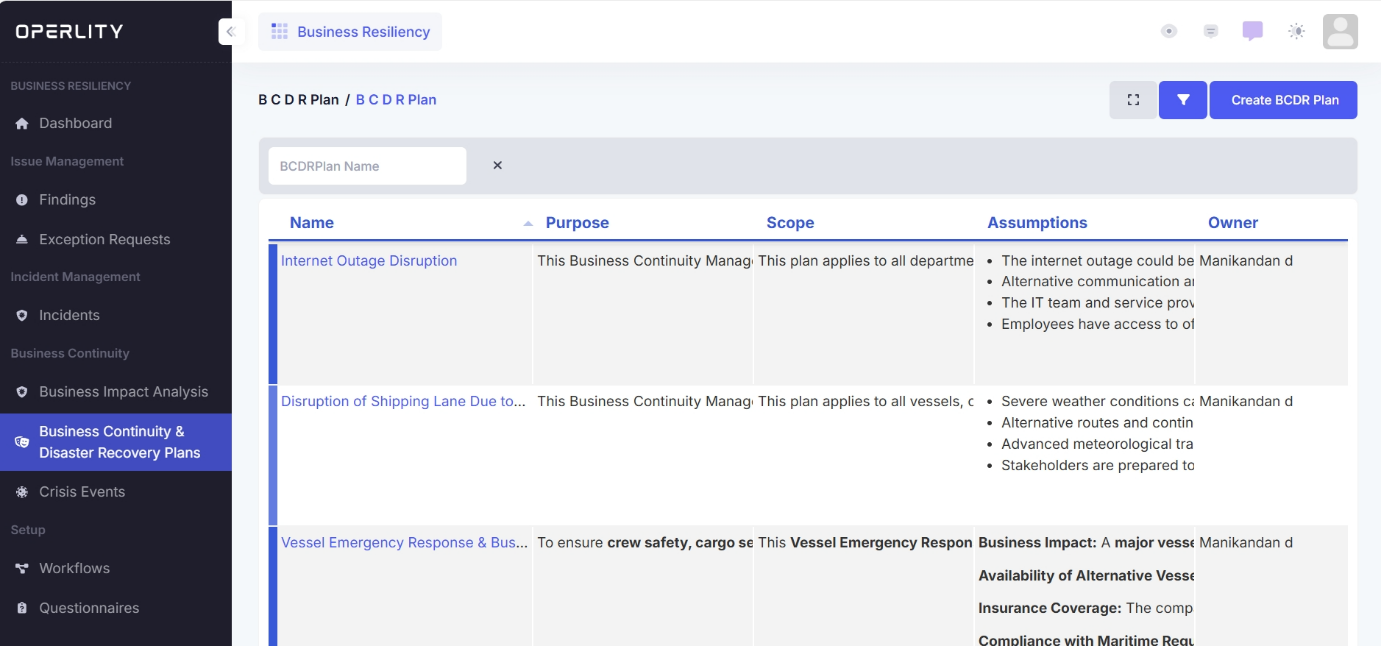
2. Creating a Business Continuity & Disaster Recovery (BCDR) Plan
Click on the "Create BCDR Plan" button in the top right corner.
Enter the following details:
- Plan Name – Provide a short, meaningful name.
- Category – Select the type of plan:
- Business Continuity Plan (BCP) – Focuses on maintaining essential operations.
- Disaster Recovery Plan (DRP) – Outlines IT and infrastructure recovery steps.
- Crisis Management Plan (CMP) – Guides handling emergency situations.
- Purpose – Define why this plan is needed.
- Scope – Outline which areas, departments, or assets the plan covers.
- Assumptions – List key assumptions (e.g., alternative resources, availability of backup systems).
- Owner – Assign a responsible person or team.
- AI Assistance (Optional) – Check this box if you want AI to generate recovery strategies.
Example:
If your company operates cargo ships, a "Vessel Emergency Response Plan" can be created to outline response actions for accidents or equipment failures.

3. Defining Recovery Strategies
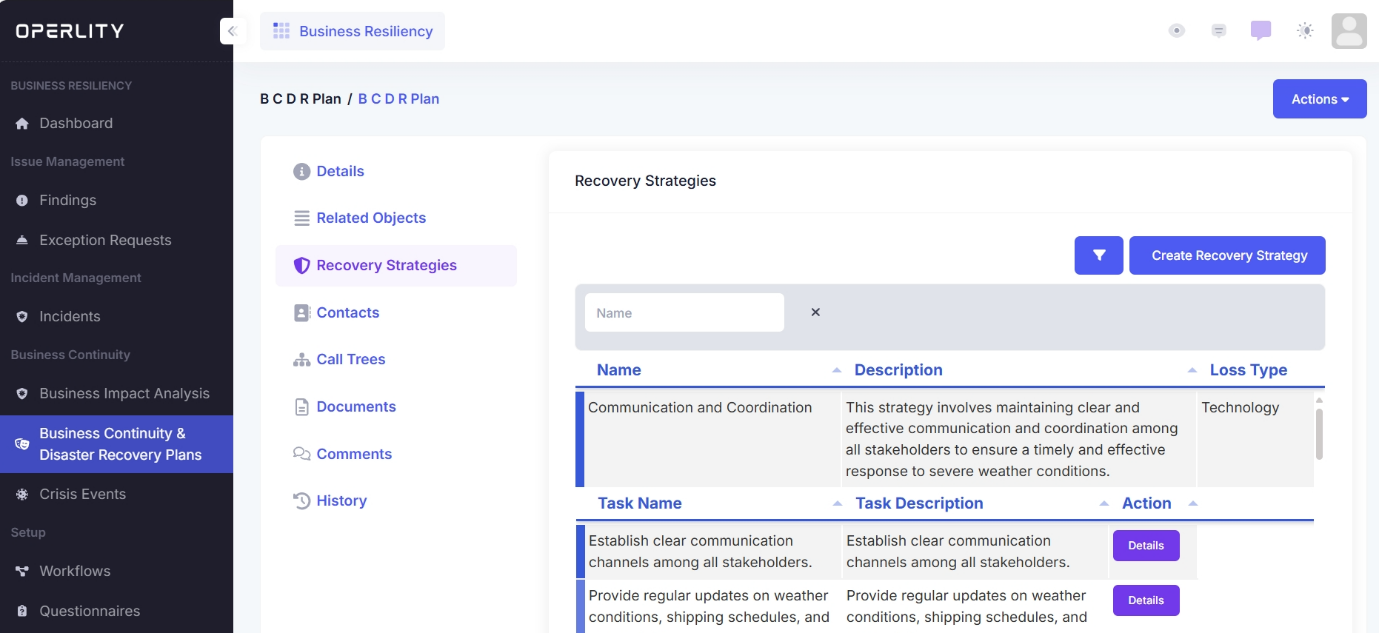
Once the BCDR plan is created, navigate to the "Recovery Strategies" tab.
- Where you can view AI-generated recovery strategies tailored for your specific plan.
- Manually add custom strategies by clicking "Create Recovery Strategy."
Example:
For a Shipping Disruption Plan, recovery strategies may include:
- Alternative Route Planning – Identify alternative shipping lanes.
- Emergency Communication Protocols – Set up rapid communication methods with affected vessels.
- Supply Chain Contingency – Secure backup suppliers for critical cargo.
4. Managing Contacts and Call Trees
4.1 Contacts
- The Contacts section stores relevant personnel who are responsible for executing the BCDR plan.
- Ensure all key stakeholders are listed, including their roles and contact details.
4.2 Creating a Call Tree
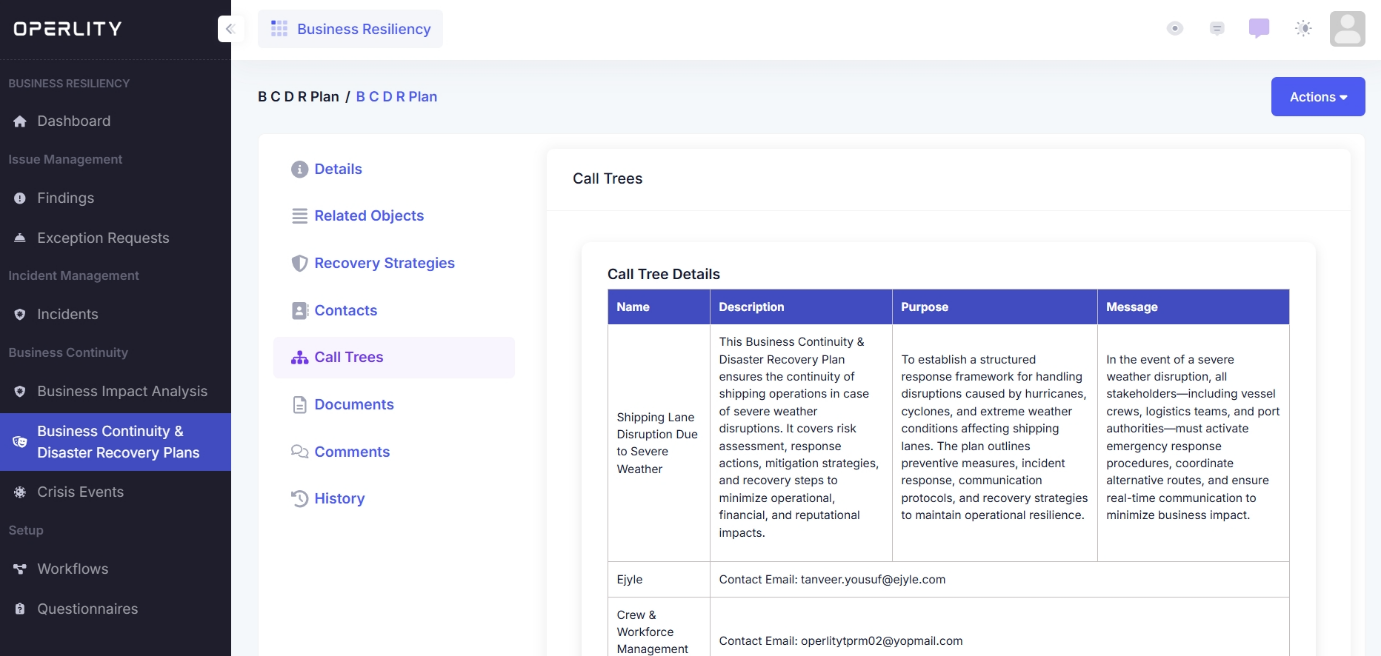
A Call Tree establishes a structured response hierarchy for crisis situations.
- Click "Create Call Tree" and enter:
- Name – A meaningful title (e.g., “Cybersecurity Incident Response”).
- Description – Briefly describe its purpose.
- Message – The predefined message that will be sent to stakeholders.
- Initiator Contact – The person responsible for activating the response.
- Associated Contacts – Team members involved in executing the plan.
Example:
For Hurricane Preparedness in Coastal Facilities, a call tree may include:
- Facility Manager – Activates the plan.
- IT Team – Ensures data backup and system shutdown if necessary.
- Logistics Coordinator – Arranges evacuation or alternative transport routes.
5. Assigning Related Objects
- Under "Related Objects," link assets, policies, and risk assessments relevant to your BCDR plan.
- Ensure all dependencies are documented to provide a complete picture of resilience efforts.
Example:
A Cybersecurity Incident Response Plan may be linked to:
- Security Policies (Access Control, Incident Response).
- IT Assets (Critical databases, servers, cloud systems).
- Existing Risk Assessments for cyber threats.
6. Uploading and Managing Documents
- Attach supporting documents like compliance reports, risk assessments, vendor contracts, or regulatory guidelines.
Example:
A Third-Party Risk Management Plan may include:
- Vendor security assessments.
- Service Level Agreements (SLAs).
- Compliance certificates (ISO 27001, SOC 2, etc.).
7. Activating and Monitoring the Plan
Once the BCDR plan is fully developed:
- Review all strategies, contacts, and call trees.
- Activate the plan when an incident occurs.
- Monitor execution and response performance.
Example:
If a major power outage impacts a company’s data center, the Disaster Recovery Plan is activated, triggering:
- Backup generator deployment.
- Emergency IT response.
- Communication with stakeholders.
8. Continuous Improvement
- Regularly test and update BCDR plans to ensure effectiveness.
- Conduct business impact analyses (BIA) to evaluate risks and response efficiency.
- Schedule simulated crisis exercises to improve preparedness.
Example:
A Financial Institution’s Cyber Attack Response Plan is tested quarterly through:
- Simulated phishing attacks.
- System recovery drills.
- Employee cybersecurity training.
Was this article helpful?
That’s Great!
Thank you for your feedback
Sorry! We couldn't be helpful
Thank you for your feedback
Feedback sent
We appreciate your effort and will try to fix the article