Administrators can configure and manage tenant settings to ensure accurate organizational setup, compliance tracking, and subscription management.
1. Accessing the Admin Portal
To edit your tenant profile, follow these steps:
- Log in to the Admin Portal.
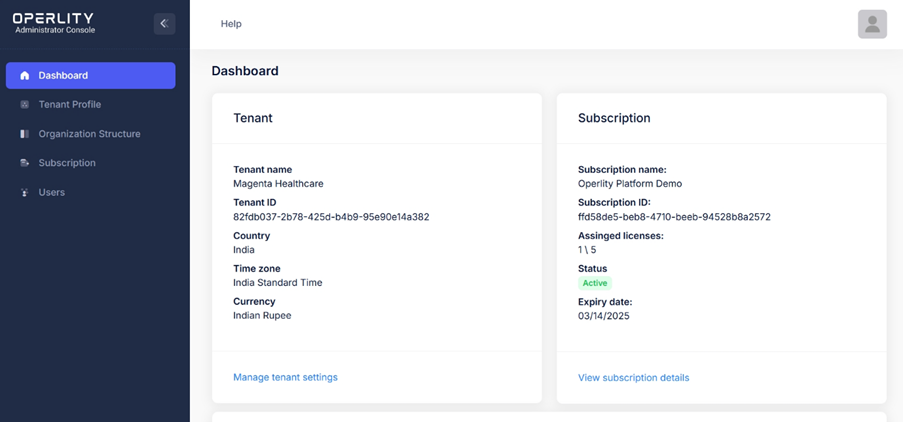
- The Dashboard will be displayed, providing an overview of your Tenant and Subscription details.
2. Understanding the Dashboard
Once logged in, the Dashboard presents the following key sections:
Tenant Information
- Tenant Name – The name of your organization or entity.
- Tenant ID – A unique identifier assigned to your tenant.
- Country – The country where your organization operates.
- Time Zone – The default time zone set for your account.
- Currency – The currency used within the system.
Subscription Details
- Subscription Name – Displays the name of the GRCHub subscription plan.
- Subscription ID – A unique identifier for your subscription.
- Assigned Licenses – The number of licenses allocated and available.
- Status – Indicates whether your subscription is active or expired.
- Expiry Date – The end date of your current subscription.
3. Managing Tenant Profile
To modify tenant profile, there are two ways to access the configuration page:
- Option 1: Click "Manage Tenant Settings" at the bottom of the Tenant section in the Dashboard.
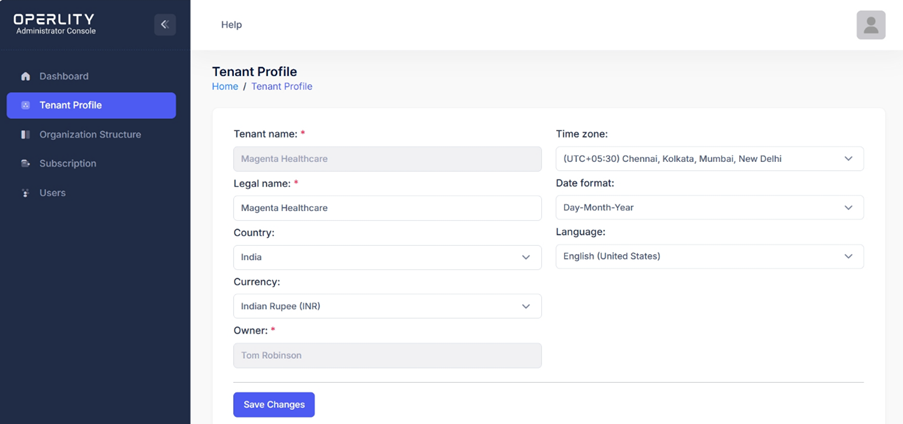
- Option 2: Navigate to the "Tenant Profile" tab from the left-hand menu.
4. Editing Tenant Information
On the Tenant Profile page, you can edit the following details:
- Legal Name – The legally registered name of your organization.
- Country – The primary country of operation.
- Time Zone – Set the appropriate time zone for your organization.
- Currency – Define the currency for transactions and reporting.
- Date Format – Choose the preferred date format (Day-Month-Year or Month-Day-Year).
- Language – Set the default language preference.
5. Saving Changes
- Once the necessary updates are made, click "Save Changes" to apply the modifications.
By properly configuring tenant settings, organizations ensure that all compliance and governance activities align with their business structure, time zones, and regulatory requirements.
Was this article helpful?
That’s Great!
Thank you for your feedback
Sorry! We couldn't be helpful
Thank you for your feedback
Feedback sent
We appreciate your effort and will try to fix the article