We allow administrators to configure their organization’s hierarchy by defining divisions, departments, and organizational units. This helps structure compliance, risk management, and audit processes efficiently.
1. Navigating to the Organization Structure
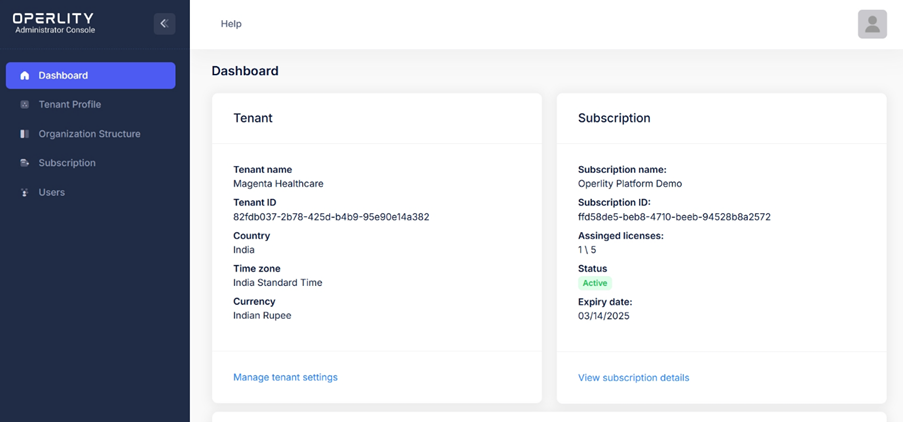
- Log into the Admin Portal.
- From the left-hand menu, select "Organization Structure."
- Here, you will see your company name displayed in a hierarchical format.
2. Managing the Organization Structure
To add or modify the organization structure:
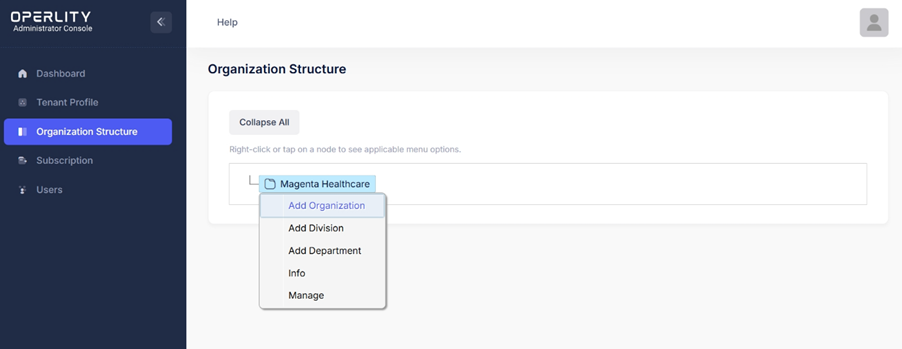
- Right-click on your company name (e.g., Magenta Healthcare).
- A menu appears with the following options:
- Add Division – Define a business division under the organization.
- Add Department – Create a department within a division.
- Info – View details like ID, Name, and Type.
- Manage – Further customize settings.
✅ Example: If your company has multiple business units, you can create divisions like "Finance," "IT Security," and "Risk Management" and then add relevant departments under each.
3. Viewing Organizational Details
- When you click on "Info", a panel opens displaying:
- ID – The unique identifier for the entity.
- Name – The name of the division or department.
- Type – Specifies whether it is an organization, division, or department.
Finalizing the Organization Structure
- Once all divisions and departments are created, save changes, and the updated hierarchy.
This structured organization ensures that users can efficiently assign compliance responsibilities and manage risk at different levels within the business.
Was this article helpful?
That’s Great!
Thank you for your feedback
Sorry! We couldn't be helpful
Thank you for your feedback
Feedback sent
We appreciate your effort and will try to fix the article