Managing third-party relationships is essential for mitigating risks and ensuring compliance with security, operational, and regulatory requirements. Operlity’s Third-Party Risk Management (TPRM) module provides a structured workflow to onboard and offboard vendors efficiently.
1. Navigating to the Third-Party Risk Management Module
To manage third parties:
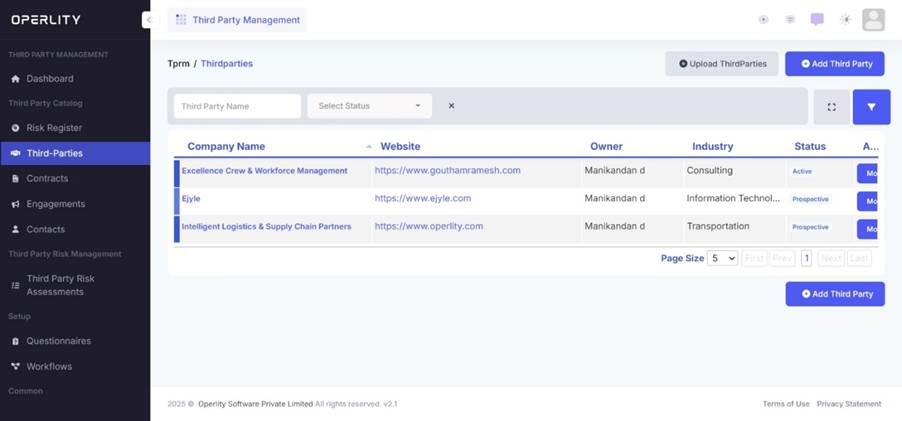
- Go to the Third-Party Risk Management module from the left-hand menu.
- Click on the “Third Parties” tab.
- This section allows users to:
- Add third parties manually (for individual vendors).
- Bulk import third-party data (for multiple vendors at once).
Example: If your organization collaborates with multiple vendors, bulk import functionality allows you to onboard all at once instead of adding them one by one.
2. Evaluating and Onboarding Third Parties
To onboard a new third party:
- Click on a third-party account to open its details.
- The third-party workflow will indicate where the vendor stands in the onboarding process.
- The first step is evaluation – before onboarding, you need to assess the vendor’s risk profile.
- Create a Third-Party Risk Assessment by:
- Using AI to generate a questionnaire.
- Selecting a predefined questionnaire template from the system.
- Send the assessment to the vendor for completion.
Once the assessment is sent:
- The vendor can submit responses directly in the system.
- The assessor and vendor can communicate through comments and clarifications.
- After reviewing the vendor’s responses, the organization can decide whether to proceed with onboarding or reject the vendor.
Example: If a vendor cannot provide sufficient security documentation, the organization may decide not to onboard them.

3. Offboarding a Third Party
If an organization decides to offboard a third party:
- Click on “Initiate Offboarding” within the third-party profile.
- The system will automatically switch to the offboarding workflow.
- Before proceeding with offboarding, conduct a final risk assessment to:
- Evaluate any outstanding risks with the vendor.
- Determine if the vendor should still be retained.
- Based on the assessment, decide whether to proceed with offboarding or revoke the request.
Was this article helpful?
That’s Great!
Thank you for your feedback
Sorry! We couldn't be helpful
Thank you for your feedback
Feedback sent
We appreciate your effort and will try to fix the article