A Business Impact Analysis (BIA) is crucial for identifying critical business processes, evaluating potential disruptions, and ensuring business continuity. GRCHub enables users to create a structured BIA project to assess operational, financial, reputational, and strategic impacts.
1. Navigating to the Business Resiliency Module
To create a BIA project, follow these steps:
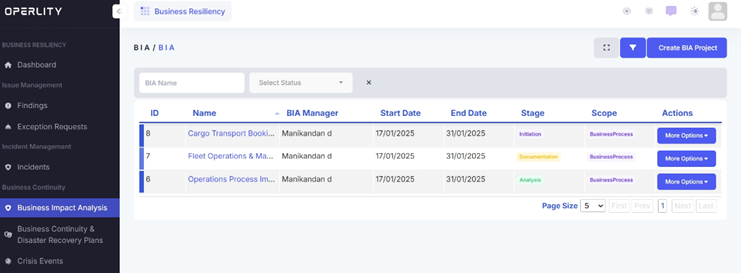
- Go to the Business Resiliency module.
- From the left-hand menu, click on Business Impact Analysis.
- This section will display all existing BIA projects, their managers, stages, and business processes.
2. Creating a BIA Questionnaire
Before starting a BIA project, a questionnaire must be created to evaluate risks and business process dependencies. Follow these steps:
- Click on Questionnaire under the Setup section.
- Create a questionnaire (either manually or using AI assistance).
- Review the questionnaire and publish it.
Once the questionnaire is created, you can proceed with the BIA project.
3. Creating a New BIA Project
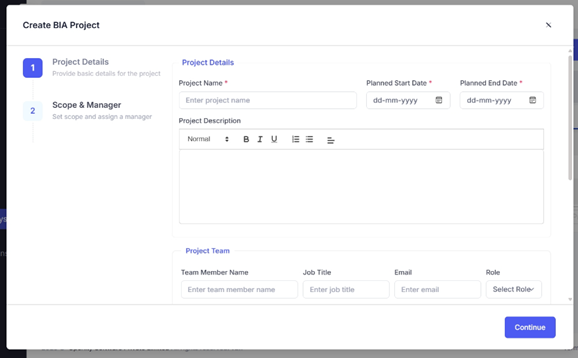
- Click on Create BIA Project in the top-right corner.
- Fill in the required details:
- Project Name
- Planned Start and End Date
- Project Description
- BIA Manager (who will oversee the project)
- Business Process Scope (e.g., Fleet Operations, Cargo Transport, IT Services)
- Budget (optional)
- Team Members & Roles
- Click Continue to finalize and create the project.
4. Initiation Stage: Selecting the Questionnaire
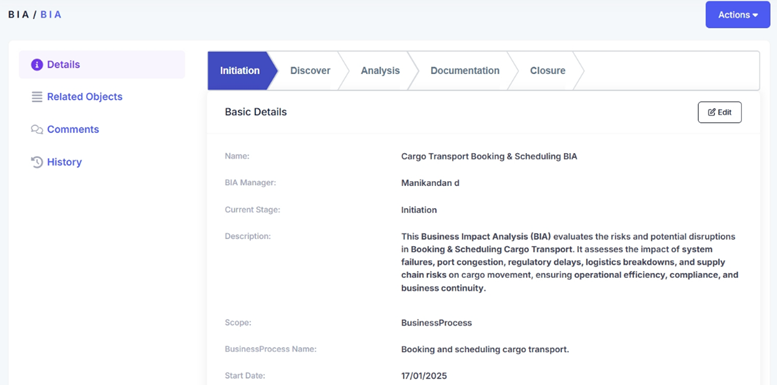
Once the BIA project is created, the workflow stages will be displayed:
- Initiation
- Discover
- Analysis
- Documentation
- Closure
- In the Initiation stage, you need to select the questionnaire you created earlier.
- You also have the option to enable Operlity Intelligence, which:
- Analyzes impact scores for the selected business process.
- Calculates the Recovery Time Objective (RTO), Recovery Point Objective (RPO), and Maximum Tolerable Downtime (MTD).
- Provides impact insights across multiple categories.
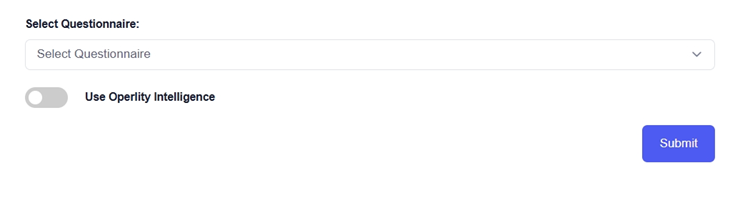
- Once selected, click Submit to proceed.
5. Conducting the Business Impact Analysis
- In the Analysis Stage, review the generated impact scores.
- Assess the severity of disruptions on financial stability, operations, compliance, and reputation.
- Add an executive summary and recommendations for mitigation measures.
6. Completing the BIA Project
- Once all sections are reviewed, proceed to the Documentation stage.
- Finalize the BIA Report, ensuring all findings are captured.
- Submit the completed BIA project for final approval and closure.
Was this article helpful?
That’s Great!
Thank you for your feedback
Sorry! We couldn't be helpful
Thank you for your feedback
Feedback sent
We appreciate your effort and will try to fix the article