1. Navigating the Incident Management Module
- Go to the Business Resiliency Module from the left-hand menu.
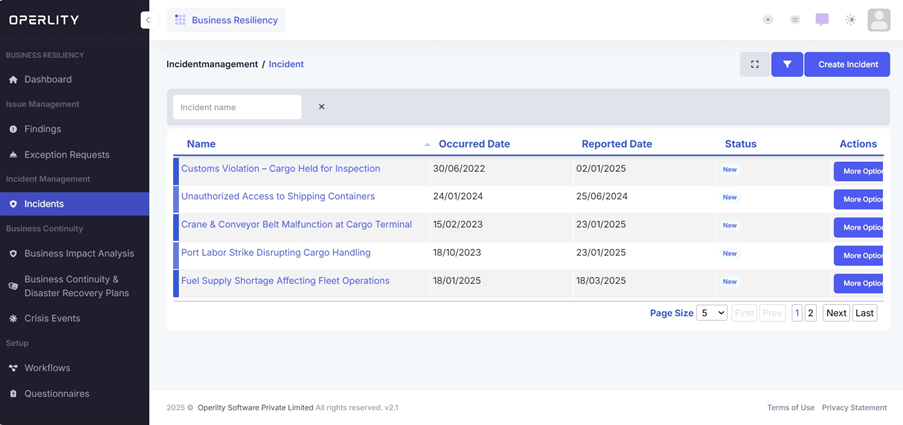
- Click on Incidents, where you will find a table listing all recorded incidents.
- The table provides details such as:
- Incident Name
- Occurred Date
- Reported Date
- Status
- Actions
Example:
If an incident occurs, such as "Unauthorized Access to Shipping Containers," it will be recorded in the Incident Management Module for further analysis and escalation.
2. Viewing and Managing Incident Details
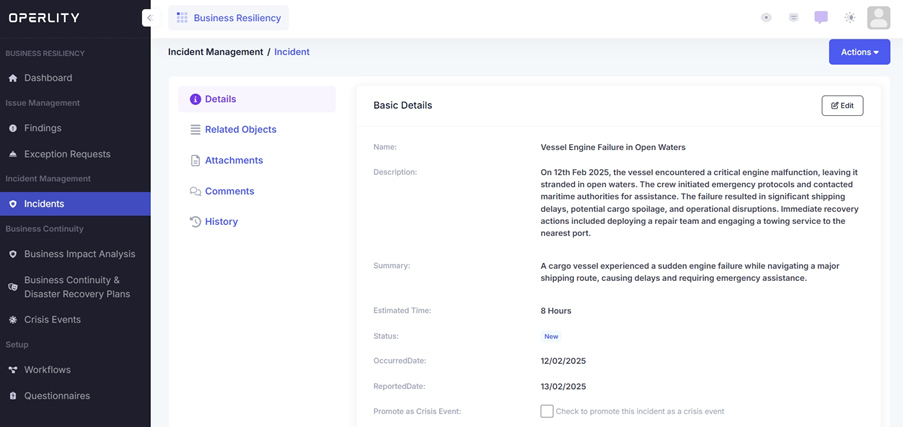
- Click on an incident to view its full details.
- The Incident Details Page includes:
- Name, Description, Summary
- Estimated Time to Resolve
- Status of the Incident
- Occurred & Reported Dates
- Checkbox to Promote as a Crisis Event
Example:
For the "Vessel Engine Failure" incident:
- The system logs the impact on cargo shipping.
- A team is assigned to manage recovery actions.
- You decide to escalate it to a Crisis Event due to its operational impact.
3. Promoting an Incident to a Crisis Event
- At the bottom of the Incident Details page, locate the "Promote as Crisis Event" checkbox.
- Check this box to escalate the incident into a Crisis Event.
- This action will trigger the Crisis Management Workflow, including:
- Identification of the Crisis
- Assessment & Risk Analysis
- Response & Recovery Actions
- Final Review and Documentation
Example:
A "Crane & Conveyor Belt Malfunction at Cargo Terminal" incident is escalated to a Crisis Event because:
- The disruption is affecting multiple shipments.
- It requires emergency response coordination.
- Stakeholders must be alerted to mitigate financial losses.
Click Save to confirm.
4. Managing the Crisis Event
Once the incident is escalated to a crisis event, it is moved to the Crisis Events tab. You can then:
- Activate the BC/DR Plan (if applicable).
- Notify stakeholders and response teams.
- Document actions taken and mitigation strategies.
- Assess operational and financial impacts.
To learn how to manage the crisis, refer to our "How to Manage a Crisis Event and Activate a BC/DR Plan" guide.
Was this article helpful?
That’s Great!
Thank you for your feedback
Sorry! We couldn't be helpful
Thank you for your feedback
Feedback sent
We appreciate your effort and will try to fix the article