Audit engagements help organizations assess their compliance, security, and operational effectiveness. The Audit Management Module enables users to conduct structured internal and external audits, ensuring adherence to industry standards.
1. Navigating to the Audit Management Module
To initiate an audit, follow these steps:
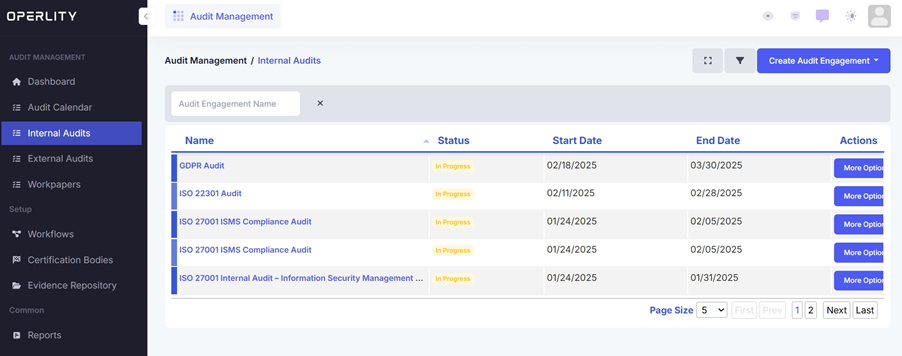
- Access the Audit Management Module from the left-hand menu.
- Select Internal Audits or External Audits, depending on the type of audit to be conducted.
- Click on the desired audit engagement to open its details.
Example:
A financial services company preparing for ISO 22301 Business Continuity Management System (BCMS) certification selects the ISO 22301 Internal Audit from the audit list to assess compliance with business continuity standards.
2. Starting the Audit
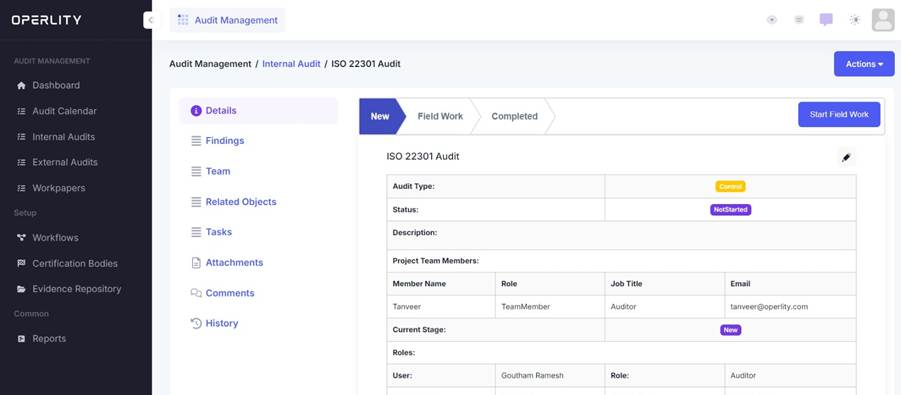
- Click "Start Field Work" to begin the audit.
- Ensure all necessary team members have been assigned.
- Allocate specific workpapers to relevant auditors.
Example:
A SOC 2 compliance audit requires evaluations across multiple domains, such as:
- Security (Firewalls, Access Controls)
- Availability (Disaster Recovery, Redundancy)
- Confidentiality (Data Encryption, Secure Transmission)
The audit manager assigns workpapers accordingly to specialists in each domain.
3. Adding Team Members
Before starting the audit, team members must be assigned:
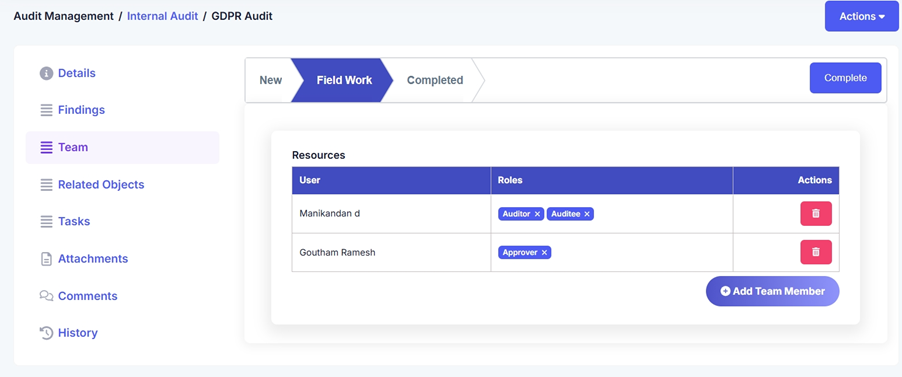
- Click on the Teams tab on the left side of the audit engagement.
- Click "Add Team Member" and enter the required details.
- Assign roles to each team member, such as Lead Auditor, Reviewer, or Contributor.
- Once team members are added, allocate specific workpapers based on their expertise.
Example:
For an ISO 27001 audit, a security specialist may be assigned workpapers related to Access Control, while a compliance officer may be responsible for Regulatory Compliance assessments.
4. Completing the Audit
- Once all workpapers are reviewed and evidence is collected, the audit is finalized.
- The audit status changes from "In Progress" to "Completed".
- A final audit report is generated, summarizing compliance status, findings, and recommendations.
Example:
A supply chain company auditing vendor risk management completes the audit, generating a final report highlighting third-party security gaps, which will be addressed in vendor contracts moving forward.
By following this structured approach, organizations can streamline their audit processes, enhance compliance, and mitigate risks effectively.
Was this article helpful?
That’s Great!
Thank you for your feedback
Sorry! We couldn't be helpful
Thank you for your feedback
Feedback sent
We appreciate your effort and will try to fix the article